Warehouse integration
Prerequisites
Reference
GET /skus Get a list of SKUs
GET /orders/{orderType} Get list of orders. E.g. inbounds or outbounds.
Get inbound orders
Endpoint
Replace {orderType} including the curly brackets with inbounds
1
| GET /orders/{orderType}
|
Request parameter (path)
| key |
value |
type |
description |
| orderType |
inbounds |
string |
Inbound orders |
Example
Request parameters (query)
Optionally you can provide additional parameters in in the URL query.
| key |
value |
type |
description |
| status[eq] |
order |
string |
Confirmed orders only |
| include |
pickup_from_location,pickup_from_partner,inbound_lots,inbound_lots.lot,inbound_lots.sku |
string |
Include info about the pickup location, partner, lots and SKU for the inbound order in the response |
| deliver_to_location_num[eq] |
- |
integer |
Filter by the number of a location as shown in the tracezilla application. |
| deliver_to_location[eq] |
- |
UUID |
Filter by the UUID of a location. |
| tags[eq] |
- |
UUID |
Include orders that has this tag UUID |
| tags[in] |
- |
Comma separated UUIDs |
Include orders with any one of the tag UUIDs |
location_num in webapp
To find the location number for deliver_to_location_num, go to:
- app.tracezilla.com
- Partners
- Select partner
- Find the “Locations” section
location_num is shown between parenthesis
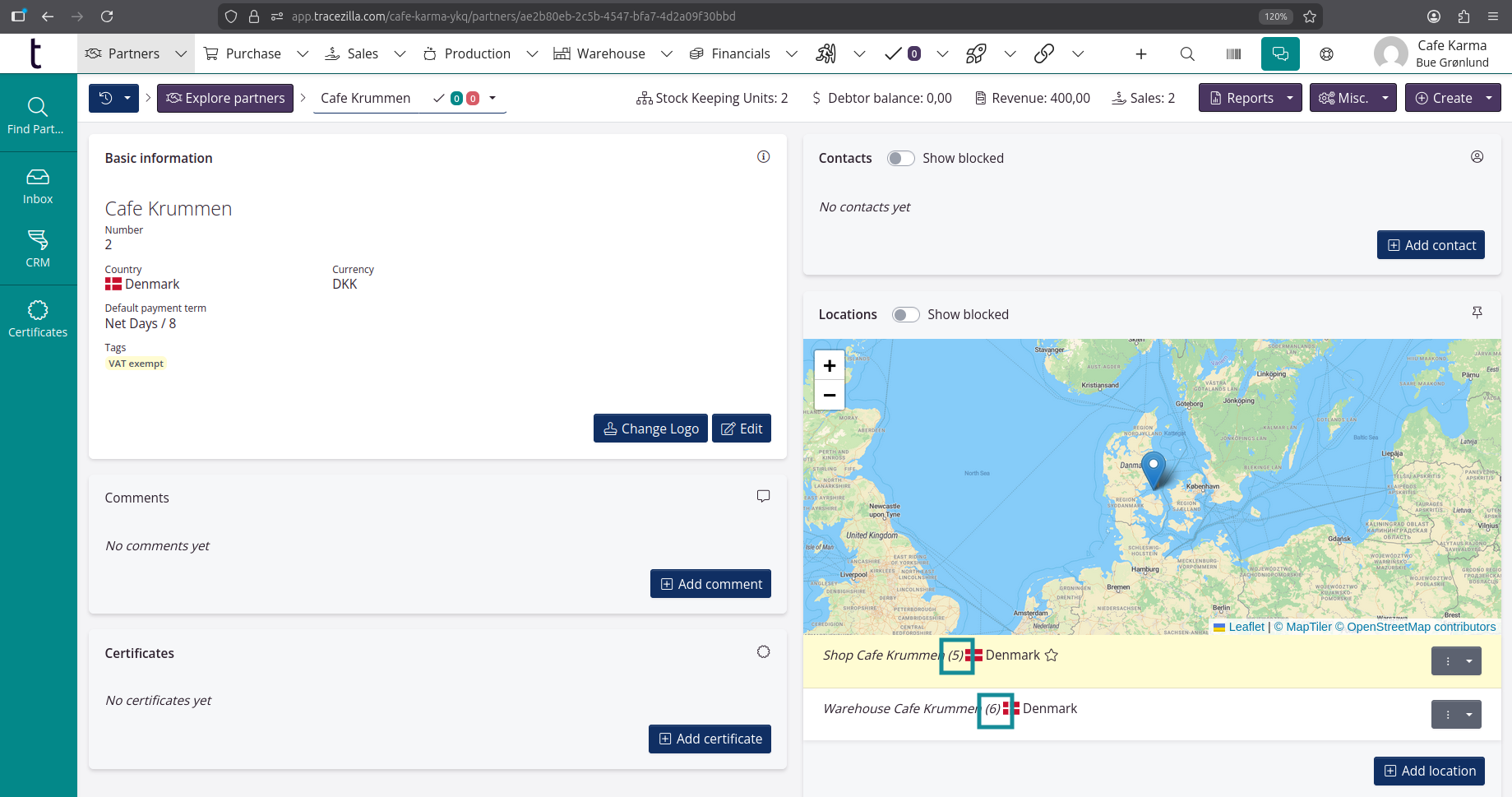
location_num from Rest API V1
Get a list of locations through the API:
Rest API V1 / Use-case examples / Manage locations#list-of-locations
GET /locations response sample:
1
2
3
4
5
6
7
8
9
10
| {
"data": [
{
"id": "9eb34497-e393-46cc-9141-f4ad9f7ceea1",
"number": 1,
"partner_id": "feea330b-a635-411e-a3d5-9191c911d381",
"name": "Headquarters",
"country": "DK",
"address": "Example road 123",
...
|
Extract "number": 1 for deliver_to_location_num
Inbound orders example curl request
1
2
3
4
| curl -X 'GET' \
'https://app.tracezilla.com/api/v1/example-company/orders/inbounds?sortBy=created_at&sortDirection=asc&tags%5Bin%5D=47aeed88-c455-4907-bf81-347c70cd9b71,c2417d56-4751-4a1e-8fb9-21223cc0a8a8&include=pickup_from_location%2Cpickup_from_partner' \
-H 'accept: application/json' \
-H 'Authorization: Bearer {yourBearerToken}'
|
Get outbound orders
Endpoint
1
| GET /orders/{orderType}
|
Request parameter (path)
| key |
value |
type |
description |
| orderType |
outbounds |
string |
Outbound orders |
Example
Request parameters (query)
Optionally you can provide additional parameters in in the URL query.
| key |
value |
type |
description |
| status[eq] |
order |
string |
Confirmed orders only |
| include |
deliver_to_location,deliver_to_partner,outbound_lots,outbound_lots.lot,outbound_lots.sku |
string |
Include info about the location that is delivered to, partner, lots and SKU for the outbound order in the response |
| pickup_from_location_num[eq] |
- |
integer |
Filter by the number of a location as shown in the tracezilla application. |
| pickup_from_location[eq] |
- |
UUID |
Filter by the UUID of a location. |
| tags[eq] |
- |
UUID |
Include orders that has this tag UUID |
| tags[in] |
- |
Comma separated UUIDs |
Include orders with any one of the tag UUIDs |
Send to WMS
Adjust lot quantities in bulk