Webshop integration
Prerequisites
- Bearer token or client credentials
- API base url from tracezilla for your company
- Optionally a tracezilla login to access Swagger API documentation
- Managed inventory in tracezilla
Reference links
Reference the endpoint documentation:
GET /inventory
PUT /orders/sales
- Swagger API documentation > PUT /orders/sales > Request body > Schema
- tech docs > PUT /orders/sales > Request body JSON schema
B2B sales order
GET /inventory
Example response
To check availability in the shop before a customer places an order, you can:
- Search
"data"list to find the SKU by"sku_code" - Read
"traceable_quantity_available"
1
2
3
4
5
6
7
8
9
10
11
12
13
14
15
16
17
18
19
20
{
  "data": [
    {
      "sku_id": "76ae64bc-2d39-4b79-bc5e-0e9f6edf3cf6",
      "sku_code": "10108",
      "traceable_quantity_available": 18,
      "traceable_quantity_on_hand": 32,
      "none_traceable_quantity_available": 0,
      "none_traceable_quantity_on_hand": 0
    },
    {
      "sku_id": "143dd330-f7e6-490d-86e2-9ed243d272dd",
      "sku_code": "10107",
      "traceable_quantity_available": 3,
      "traceable_quantity_on_hand": 3,
      "none_traceable_quantity_available": 0,
      "none_traceable_quantity_on_hand": 0
    }
  ]
}
PUT /order/sales
This endpoint expects json in the request body.
In "order_header" you find "ext_ref" (string) that is the order reference code.
1
2
3
4
{
  "order_header": {
    "ext_ref": "GEN-24153",
    ...
If an order with the same "ext_ref" is submitted twice to the Rest API it will only be created once in tracezilla.
Excluded keys
In order_header.partners these key/value pairs may typically not be included:
"supplier"not included"producer"not included
Example JSON request content
Here’s what the the body for a PUT /order/sales request could look like:
1
2
3
4
5
6
7
8
9
10
11
12
13
14
15
16
17
18
19
20
21
22
23
24
25
26
27
28
29
30
31
32
33
34
35
36
37
38
39
40
41
42
43
44
45
46
47
48
49
50
51
52
53
54
55
56
57
58
59
60
61
62
{
    "order_header": {
        "currency": "SEK",
        "delivery_date": "2026-02-19",
        "exchange_rate": 100.0,
        "ext_ref": "GEN-24153",
        "pickup_date": "2026-02-19",
        "status": "order",
        "marking": "GEN-24153",
        "partners": {
            "customer": {
                "partner": {
                    "country": "SE",
                    "name": "ICA Maxi Kungälv",
                    "debtor_no": "1"
                },
                "location": {
                    "country": "SE",
                    "name": "not used",
                    "number": 2
                }
            },
            "deliver_to": {
                "partner": {
                    "country": "SE",
                    "name": "ICA Maxi Kungälv",
                    "debtor_no": "1"
                },
                "location": {
                    "country": "SE",
                    "name": "not used",
                    "number": 2
                }
            },
            "pickup_from": {
                "partner": {
                    "country": "SE",
                    "name": "HK Korv Lager",
                    "number": 1638
                },
                "location": {
                    "country": "SE",
                    "name": "not used",
                    "number": 2925
                }
            }
        },
        "tag_ids": []
    },
    "outbound_skus": [
        {
            "quantity": 4,
            "sku_code": "10108",
            "unit_price": 524.56
        },
        {
            "quantity": 2,
            "sku_code": "10107",
            "unit_price": 480.72
        }
    ]
}
B2C sales order
To avoid having a bunch of small orders, you can aggregate customer orders into a single sales order with your own order reference code supplied in "order_header" as "ext_ref" for the aggregated order:
1
2
3
4
{
  "order_header": {
    "ext_ref": "aggregated-order-2025-01-14",
    ...
Untraced orders
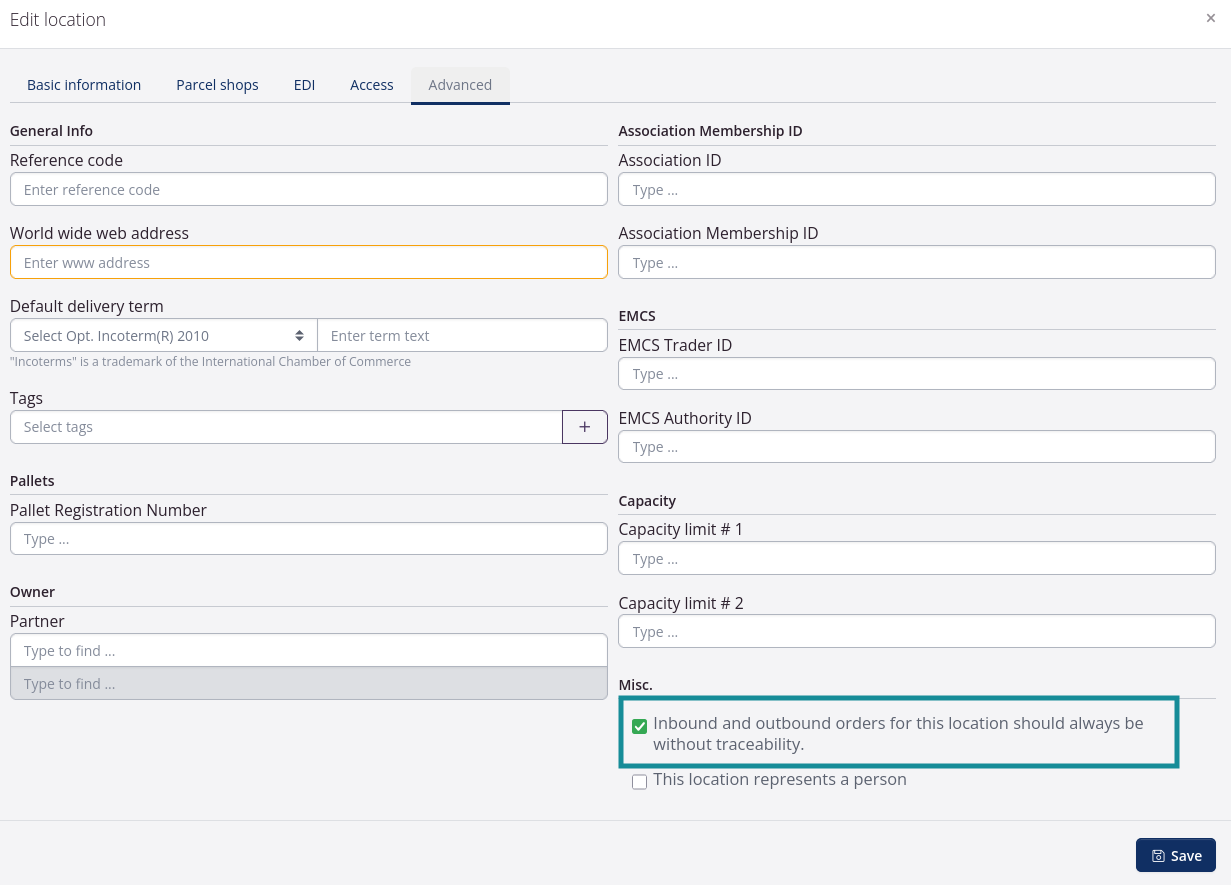
Depending on your needs, your workflow can be configured to pluck untraced individual pieces instead of traced collies.
tracezilla > Partner > Location > Edit > Advanced